
Welcome to Centre 33's online support service. This page contains more information about logging in for the first time and what to expect from this website. To find out more about online counselling, have a look at:
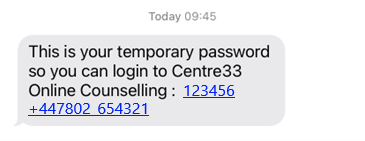
Welcome text message
Once your first counselling appointment is confirmed, you will receive an automated SMS message. This contains a one-time passcode and a link to log in to this website. You can click the link in the message to log in using your phone, or to use another device, open this link in your web browser https://onlinesupport.centre33.org.uk/otplogin.
Logging in for the first time
- Click here to open the login page
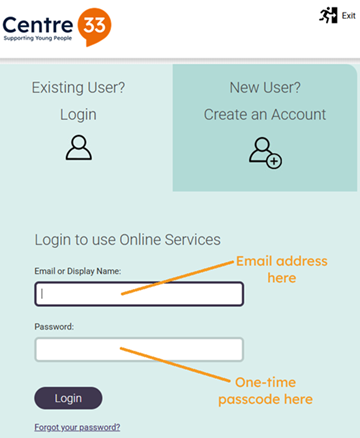
- Click on Existing User? Login (your account has already been set up for you)
- Type your email address into the box labelled Email or display name:
- Type the one-time passcode from the SMS message into the box labelled Password:
- Click the Login button
Dashboard
From your dashboard home page, you can access all of the features of the online support website. The two most useful areas are My Inbox and My Sessions.
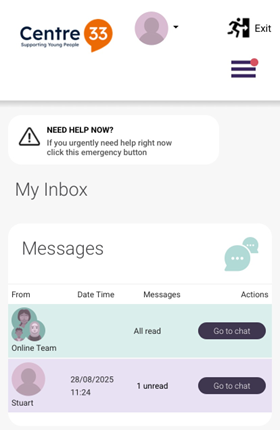
My Inbox, like a regular mailbox, contains all of the messages sent to you from your counsellor or other members of the support team. If you have any unread messages, they will be highlighted.
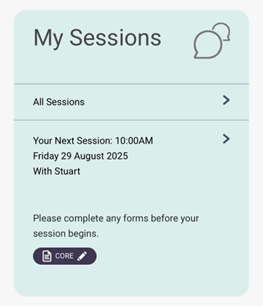
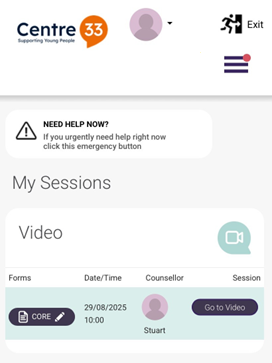
My Sessions is a list of all of your counselling appointments, both upcoming ones and ones that have already happened. When your next appointment is due to start, you can navigate to it quickly from this list. You will also be able to see any CORE measurement forms that you are due to complete or have completed already.